ELOSTAN: PRODUCT

Get Latest & Trending Tech News

Showing posts with label PRODUCT. Show all posts

Tuesday, 1 September 2015

Shoppers in the UK will now be able to spend up to £30 using contactless cards

September 01, 2015
Shoppers in the UK will now be able to spend up to £30 using contactless cards after the limit was increased.
The limit per transaction for the so-called tap and pay cards, which do not require a PIN or a signature to authorise payment, was previously £20.
The move follows a huge rise in the number of people using contactless cards in the UK.
Transactions for the first half of this year totalled £2.5bn, already higher than the £2.32bn spent in 2014.
The UK Cards Association, the trade body for the card payments industry, said the increase meant that the average supermarket spend of £25 would now be covered.
"The growth in contactless payments shows people want to use contactless cards, and increasing the limit gives customers even more opportunities to pay in this way," said chief executive Graham
'The new normal' In July, consumer group Which? warned that data from contactless cards could be easily stolen by determined fraudsters.
But the trade body said fraud via the cards was "extremely low", at less than one penny for every £100 spent.
The increase also comes after technology giant Apple allowed users of its latest devices to make contactless payments.
Kevin Jenkins, managing director UK and Ireland at Visa Europe, said contactless payments were becoming the "new normal".
"We've seen unprecedented growth in this area, with the number of Visa contactless transactions more than trebling in the past year in the UK," he added.
The increase was first announced in February.
Read More

Sunday, 23 August 2015

6 Apps to Use With the Galaxy Note 5 and Whip Out That S Pen!

August 23, 2015

We’ve rounded up some of our favorite apps that work with the S Pen, including a few for artists, note-takers, and doodlers.

ArtFlow


ArtFlow Note 5 appDrawing with the S Pen is fun, and ArtFlow is one of the best apps for artists. The settings are varied and offer lots of choice in terms of brushes, color palettes, pencils, and more. The app supports layers, so you can add or delete layers as you go. It’s easy to hide the menus when you want a blank canvas to draw on, but a tap in the corner on the little circle brings them back up quickly. ArtFlow is perfect for Note 5 users who want to sketch on the go or even create small masterpieces.

 Autodesk Sketchbook
Autodesk Sketchbook Note 5 appAnother excellent choice for artists is Autodesk’s Sketchbook app. The interface is simple, there are layers, and you have lots of control over the tools you use to create your masterpieces. The free version offers enough drawing and painting tools to keep most people happy, but if you want more features and brushes, it’ll cost you $4.35. You can also sgn up for a membership to Autodesk for $25 a year, if you want to design your own.


READ MORE.
Read More

Google's Android Wear Will Let You See More Info at a Glance

August 23, 2015


The search giant is trying to make smartwatches more useful, letting you see how many unread emails you have or how many calories you’ve burned – right from the watch face. UnderArmour's watch face lets you see how many calories you've burned.
Google wants to make it quicker to get information from a smartwatch.
To do that, the search giant on Thursday announced new options for watch faces on Android Wear devices, which are powered by Google-made software tailored specifically for wearables.
The new watch faces will let people immediately see information like the weather or a step counter right when they glance at their smartwatch, instead of having to change to a different screen. The feature will be available in the coming weeks, Google said.
"With just a tap, your watch face can change its design, reveal more information, or even launch a specific app," Flavio Lerda, an Android Wear software engineer, wrote in a statement.
The move indicates Google is responding to users' requests to more easily see information their watches can display. When the first Android Wear watches were released last year, Google at the time opted for simpler watch faces, likely trying not to overwhelm users who are not used to wearing a computer on their wrists. Apple, with its Apple Watch, allows people to do some things from its default screen, like launching an alarm or the watch's fitness features. But, true to Apple style, the watch faces have largely remained simple as well.

Read More

Sunday, 16 August 2015

How to Create Windows 10 System Image Backup

August 16, 2015
The process explained below does not require you to use any third party tool or expensive software to take the system image backup
Previous versions of Windows - 7 and 8 had this ability of creating a full system backup image. Windows 10 has improved on the process of backup and recovery. It also gives you more access to features that help you backup and recover the operating system.

Such recovery images can be very handy to recover the default state of your hard disk, which is similar to restoring to factory settings. These images help recover especially when you're unable to boot into windows. There are several ways with which you can create such backup images. If you don't mind paying for the software product, there are third party products that you can use to take image backups of Windows 10.


For example, Norton Ghost and True Image are some of such software's that are capable of creating desktop and server installation images. These software's not only help you get backup image but also help in recovering the factory installation state. However, for those who are using Windows 10 at home, buying such software is an overkill solution. So instead of using expensive software, let's see how to do it for free. You don't even need to use any third party tool to make this system backup image.


When to take System Image Backup

Whenever you install the operating system with clean install option, it is recommended to make system image and also repair disc. When you secure yourself with these two options, you'll be prepared for any boot issues that may arise in the future.

Follow the procedure below to create system image in Windows 10.

Step 1: Right click on start menu and click on Control Panel.
Step 2: Inside control panel, click Backup and Restore.
Step 3: Click on Create System image link.
Step 4: Windows will ask you to choose location to save your system image.
Step 5: Depending on your choice, choose either DVD, USB Drive or network location to store your system image.
Step 6: Let's assume you have connected external drive, verify your backup location.
Step 7: Start the backup.

Check your backup location. Assuming it is external drive, then find the folder named "WindowsImageBackup". This folder contains the backup image which you can use to restore the Windows in future.

Windows 10 takes backup of each of your system drives. Depending on the data available, it takes several minutes to backup your drives. At the end of the process, the installer will ask you to create repair disc for Windows. Depending on your needs, you can either follow along or just dismiss the dialog box. If you happen to create a system repair disc, you get plenty of new features that allows you to repair Windows. For example, new features allow you to make system image recovery, startup image repair option, Downgrade Windows (within 30 days of upgrade) and startup settings. These tools are very important to use when you are unable to boot into your Windows desktop.

When not to use System Image

There are times when you have to make clean install and also format the master boot record. For example, If you happen to find any malware on system, you may want to use Windows ISO and make clean install. In case of virus and security issues, it is better to make clean install.

If you're upgrading from Windows 7 or 8, then you should definitely backup your system before you upgrade. If you choose to go with clean install option, taking system image backup is even more beneficial. The practice of taking system image backup will help you rollback without any glitches when you get into trouble upgrading to Windows 10.
Read More

Wednesday, 12 August 2015

video game technology include Atom mobile app in effort to win mobile customers

August 12, 2015
Atom Bank taps video game technology to win mobile customers Atom Bank's mobile banking app is so commercially sensitive that its developers won't even allow it to be demonstrated. The bank, whose founder believes can transform consumer banking in Britain, is in the final stages of preparation before launching its first products later this year.

 Its investors, who include star fund manager Neil Woodford, venture capitalist Jon Moulton and Jim O'Neill, the former chairman of Goldman Sachs Asset Management, are betting that Atom's innovative banking app will appeal to younger customers. And the bank can save money by having no branches, potentially helping it to make a profit quickly.Speaking at Atom's headquarters in Durham in the north east of England, where 100 staff are preparing for the launch, founder Anthony Thomson said Atom's timing was ideal given the surge in demand for mobile banking apps. "We are in the right place at the right time.

 I think we saw that the future was going to be mobile but I certainly didn't see the uptake being as rapid as it's been," Thomson said, referring to industry data showing mobile banking growth in Britain.The app, created by software developers who usually design video games, is expected to have particular appeal for 18-34 year-olds who are already routine users of mobile apps, Thomson said.

Watch How To Use Mobile App

DOWNLOAD MOBILE APP

DOWNLOAD GAME
Read More

England - Highway installing plug-in charging points

August 12, 2015
The government agency has announced plans to test wireless power-transfer tech that it hopes to build under the country's motorways and major A roads.It has already completed a feasibility study and is now asking companies to tender bids to host off-road trials.But one expert questioned whether such a scheme would be cost effective.


South Korean tests

Charge-as-you-drive technologies have already been pioneered elsewhere.In 2013, the South Korean town of Gumi switched on a 12km (7.5 miles) route that allows buses with compatible equipment to be charged as they drive over it. It works by a process called Shaped Magnetic Field In Resonance.
South Korea has fitted a stretch of road with equipment to wirelessly charge special buses
 Electric cables buried under the road are used to generate
electromagnetic fields, which are picked up by a coil inside the device and converted into electricity.Last year, Milton Keynes also began use of a more limited scheme, which involves buses being wirelessly recharged via plates installed into road. In this case, however, the vehicles have to stop for several minutes at a time to receive the power boost.

"What has been committed to is that by 2016 or 2017 we will hold off-road trials - in other words not on a public road," Stuart Thompson, a spokesman for Highways England, told the BBC."It's still very early days. Where exactly the trials will be has yet to be determined."Highway England says full details will be publicised once a contractor has been appointed.It aims to run the experiments for about 18 months before deciding whether to commit itself to an on-road trial.

"The potential to recharge low emission vehicles on the move offers exciting possibilities," commented Transport Minister Andrew Jones.The cost of buying and installing the charging equipment may ultimately scupper the scheme"As this study shows, we continue to explore options on how to improve journeys and make low-emission vehicles accessible to families and businesses."

However, the director of Cardiff Business School's Electric Vehicle Centre of Excellence remains sceptical."It makes sense to try it out, and the technology does obviously work," commented Dr Paul Nieuwenhuis."But it sounds very ambitious to me. Cost will be the biggest issue and I'm not totally convinced it's worth it."Battery technology is increasing -."Even if the plan ultimately comes to naught, Highways England is also committed to installing plug-in charging points every 20 miles (32.1km) on its motorway network over the "longer-term"

WATCH INSTALLATION VIDEO

CLICK TO DOWNLOAD VIDEO

CLICK TO DOWNLOAD MOBILE
Read More

Saturday, 8 August 2015

Mozilla is urging all Firefox users to upgrade to this latest version -Firefox users, here's a security flaw you'll need to fix

August 08, 2015
Firefox users, here's a security flaw you'll need to fix 
 On Thursday, Mozilla revealed a vulnerability in its browser that was discovered by a Firefox user. An ad on an unnamed news site in Russia was able to tap into the vulnerability to upload certain files from a user's computer to a server apparently based in the Ukraine. Exploiting Firefox's PDF Viewer and its use of the widespread JavaScript code, the hack seems to capture only "developer focused" files -- think FTP (file transfer protocol) -- at least in Windows. Your personal files and data aren't caught in the attack, but the hack is still alarming.

Has the world grown weary of security hacks and exploits at this point? Each day, those who browse the Web or use Windows or Adobe Flash or numerous other products seem to face yet another security worry. Even the Mac OS, which has long held a reputation as being secure, isn't immune. Software is imperfect, and hackers are always going to find a way to exploit certain weaknesses. So what do we do? Protect our computers with security software. Be careful of where we go and what we do on the Internet. Hope that vendors quickly find and fix the vulnerabilities. And Mozilla had done just that.

Released on Thursday, the latest version of Firefox -- version 39.0.3 -- contains a fix for the security hole. Mozilla is urging all Firefox users to upgrade to this latest version.
To update Firefox to the latest version, click on the Help menu from the Menu Bar or the Firefox button in the upper left corner. Then click on the setting for About Firefox. If you don't already have the latest version, you should see a button that reads "Update to 39.0.3." Click on that button, and Firefox will automatically update itself to the new, secure version, and then prompt you to restart it.

Thevulnerability affects both Windows and Linux. It does not affect the Firefox mobile app for Android as that program does not contain the PDF Viewer. It has not affected Macs as of yet, but
 Mozilla said that Apple's OS X would not be impregnable if someone were to target it. People who use software that blocks ads on the Web may have been protected from the security flaw, but that depends on the specific program and filters in place.

Mozilla expressed surprise at the types of files that were targeted.
"The files it was looking for were surprisingly developer focused for an exploit launched on a general audience news site, though of course we don't know where else the malicious ad might have been deployed," Mozilla security lead Daniel Veditz said in Thursday's security blog.
Veditz added this sobering thought: "The exploit leaves no trace it has been run on the local machine."
Read More

Thursday, 6 August 2015

Acer Launches Sales of New Windows 10 Laptops in Africa

August 06, 2015

Acer, after introducing its Cloudbook laptops earlier this week, on Thursday launched three new laptop devices - Acer Aspire E5-573, Aspire V Nitro, and Aspire R13 notebook running Windows 10.


The new Acer Aspire E5-573 powered by Redmond-based tech firm's latest operating system, would be available in two display size variants - 14-inch and 15.6-inch. The devices are said to sport a textile-pattern on the A-cover and D-cover made by a process using 3D scanning of fabric samples. The laptop runs on fifth generation Intel Core processor, clubbed with Nvidia GeForce 920M GPU, which comes with its own dedicated DDR3 VRAM. The device can support up to 16GB RAM and up to 1TB of hard disk storage.

The laptop is Skype certified and sports the company's home-made TrueHarmony audio tech, which has now been optimised for use with the Windows 10's virtual voice-based assistant, Cortana. Also included is BlueLightShield feature that reduces the amount of blue light thrown by the display, resulting in lessening of eye strain. Furthermore, the new Aspire E5-573 houses Acer's Precision Touchpad Technology, Accidental Contact Mitigation technology and more for better typing and finger input experience.

acer_aspire_v_nitro_black_edition_windows_10_2.jpg
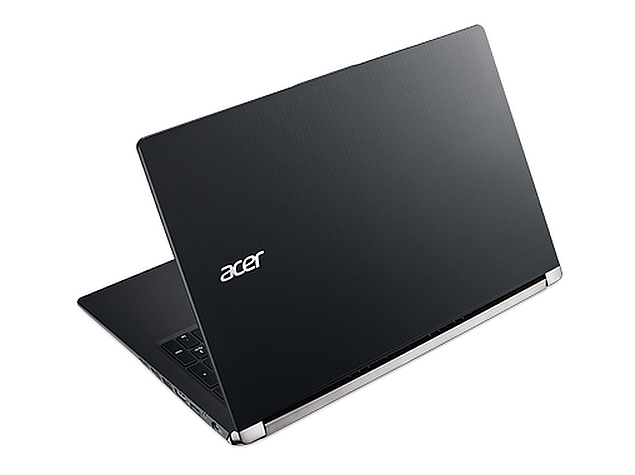
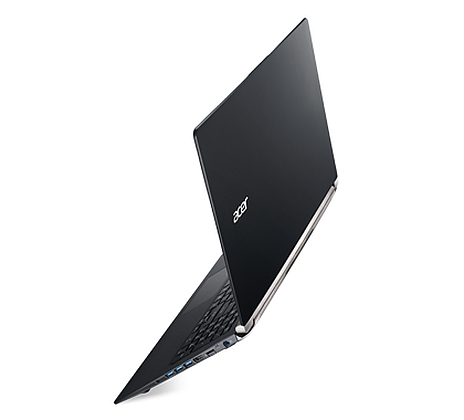
Acer also announced the new Aspire V Nitro-Black Edition (seen above) gaming laptop with Windows 10. The laptop, like its older Windows 8.1 version, comes with 15-inch 4K resolution IPS display and a slim design profile. The device also features patterned covers made by NIL (Nano Imprint Lithography) technology.

The base model runs on fifth generation Intel Core i5 processor along with either a 2GB or 4GB Nvidia GeForce GTX960M GPU. The laptop will be available in 8GB and 12GB RAM versions, and feature a 1TB HDD. Also equipped are Acer DustDefender tech and Dolby Digital Plus Home Theatre with four speakers. While the complete list of specification are not yet clear, the laptop innards are likely to match with its Windows 8.1 version listed on the company website.
acer_aspire_r13_windows_10.jpgLastly, the firm launched its Acer Aspire R 13 laptop with Windows 10, the screen of which can be turned up to 180 degrees, so that it can be used in six different modes - Notebook Mode, Ezel Mode, Stand Mode, Pad Mode, Tent Mode, and Display Mode. The laptop features a 13.3-inch display, is less than 1-inch thin, and weighs around 1.5 kgs. The Aspire R 13 with Windows 10 will be available  with a fifth generation Intel Core i5 SoC, 8GB of RAM, and up to a 512GB SSD
visit any of the stores in computer village  or visit http://www.dreamworkslimited.net/,  http://www.largemichaels.com/
Read More

A charging cable that backs up your phone -- onto itself

August 06, 2015
It's a USB drive with a charging cable. 

The cable, part of a just-released Indiegogo campaign, is available either in USB 2.0 or 3.0 versions and comes with a variety of storage options, from 16GB to 128GB.

The cable comes with an app that helps you easily sync your phone's data straight to the backup drive that's built in as part of the USB side of the cord. The app lets you play videos straight from the drive; access and move your photos and music; and automatically back up the photos you post to Facebook and Instagram, as well as back up your calendar and contacts. It also allows you to automatically sync the activity that takes place on the drive to Dropbox and Google Drive.


That in and of itself is pretty impressive, so when you add in the fact that the MemoriesCable can also be used to charge your iPad or iPhone from any USB outlet and act as a sync cable between your mobile devices and your computer, it becomes even more appealing
Read More

Wednesday, 5 August 2015

Car Manufacturer Lexus Unveils Levitating Magnetic Hoverboard

August 05, 2015
A levitating hoverboard which runs on a specially constructed skate park near has been unveiled by car manufacturer Lexus.
Footage released by the firm showed skateboarders testing the hoverboard with varying degrees of success.

The film was recorded on specially constructed skate park near Barcelona in Spain.
The hoverboard contains powerful magnets which are cooled to -197 degrees celsius with liquid nitrogen, allowing the board to ride along a track hidden in the surface of the skate park.

The firm said that the hoverboard was a prototype and would not be available for sale. The skate park has now been dismantled again
Read More

Tuesday, 4 August 2015

Epson: The printer that prints for two years

August 04, 2015

Epson claims that it has solved one of the most infuriating aspects of owning a printer -


It has unveiled a new range of EcoTank all-in-one machines aimed at consumers and small businesses that can scan and copy and, most importantly, print for up to two years before the inkjets run dry.
"The introduction of EcoTank marks a fundamental shift in the way we think about using color in business and in the home," said Keith Kratzberg, Executive Vice President, Epson America. "Epson EcoTank sets a new standard for color printing, convenience and value."
Epson Expression ET-2500 EcoTank All-In-One printer
The range consists of five printers, starting at $379 and going all the way up to $1,199 for the pro, workstation edition. However, regardless of which model you opt for, Epson claims that it will come pre-loaded with sufficient ink to meet the user's needs for up to 24 months thanks to something it's calling ‘Supertank' technology.

This is basically a set of larger reservoirs for each of the four colors needed for full color printing but topping up each is cheaper and more environmentally friendly than traditional replacement cartridges.
But as well as ‘Supertank' technology, the printers are also wi-fi-enabled so that they can be added to the home network without any fuss or cables and this also means that they can be used with smartphones and tablets as well as a PC.

The printer that prints for two years

Even as we move further and further into the digital age, there is still a demand for paper and for printing -- whether it's notes and sketches or family photos -- that's still in very rude health.
Even Evernote, the ingenious app and application developer, which initially declared war on the written note and the printed document has accepted that paper will always be paper and in recent years has realigned its offering to complement, rather than replace words, sketches, doodles and notes. It even has a range of notebooks.
Read More

BMW CEO puts digital trends at center of strategy review

August 04, 2015
BMW
BMW's new Chief Executive Harald Krueger plans to overhaul the carmaker's strategy to make it fit for the digital future of driving, he said on Tuesday.BMW teamed up with Germany's other two premium carmakers to buy Nokia's high-definition mapping business for 2.5 billion euros ($2.7 billion) this week to protect its access to key technology for connected and self-driving cars.
Krueger, who took over in May, said the strategy the company adopted in 2007 that was designed to guide it until 2020 needed to be updated. He was speaking to analysts on a call to discuss second-quarter results.
"Many trends have intensified or accelerated dramatically. Above all, digitization and the associated technical possibilities are set to change the automobile and its fundamental role in our society," he said.
"Based on this, we are currently conducting a comprehensive update of our strategy. At this stage it is still too early to go into further detail."
BMW has been exploring cooperation with U.S. consumer technology giant Apple. Last year, BMW's top brass took part in closed-door meetings with senior Apple managers to discuss vehicle manufacturing.
Read More

Microsoft to launch Windows 10 on Xbox One in November

August 04, 2015
Windows 10 Is Coming to the Xbox One in November
Microsoft first revealed its redesigned Xbox One dashboard back at E3 earlier this year, and now the company is announcing that it will arrive on consoles in November. Powered by Windows 10, the new dashboard includes features that focus on speed and performance, and a design that’s a lot more simplified.
One of the key new features in the Xbox One dashboard update is Cortana integration. You can say “Hey Cortana, record the last minute and share it to my activity feed” and it will publish a game clip straight away. Likewise, “Hey Cortana, start a party and invite Amanda” will invite a friend into a voice chat all without having to lift your fingers from your controller. Cortana will require the Kinect sensor for audio controls.

Read More

How to Stream Games From Your Xbox One to Your Windows 10 Device

August 04, 2015
You’ve taken the plunge and upgraded to Windows 10. Congrats! It’s better than Windows 8, that’s for sure. If you happen to also own an Xbox One, it’s better than any other OS, too.
That’s because Microsoft has embedded all sorts of interesting Xbox One-related features into Windows 10, including the ability to stream games from your Xbox One to your Windows 10 device. Here’s how.
How to Stream Games From Your Xbox One to Your Windows 10 Device

1. Start the Xbox app on your Windows 10 device

Every copy of Windows 10 comes with a built-in Xbox app. You can find it by clicking the Start Menu on the lower left. Open it up.
If your Windows 10 email address is the same as the one you use for your Xbox One account, you’re in luck: The app will quickly find it and, boom, your Xbox Live info will magically appear. If you use a different email address for Windows 10, just enter your Xbox Live credentials in the Xbox app.
If you don’t have an Xbox Live account, go sign up for one. It’s free, and it’s key to getting the most out of your console.
image

2. Plug in a wired gamepad

You’re going to need a controller if you want to play any games, so before you go any further, grab a wired gamepad and plug it into a USB port on your Windows 10 device. The bad news: Windows 10 currently only supports Xbox One and Xbox 360 controllers, so if you’re trying a random gamepad, it might not work.

3. Enable game-streaming on your Xbox One

Your console needs permission to stream content. So turn on your Xbox One, head over to Settings > Preferences. See the “Allow game streaming to other devices” option? Make sure it’s checked.

4. Connect your Windows 10 device and your Xbox One to the same network

Game-streaming only works if both systems can easily find each other. That means ensuring they’re on the same local network. You can double-check this in Windows 10 by hovering your mouse over the little Wi-Fi (or wired) network icon in your System Tray at the bottom right of the desktop.
image
On your Xbox One, you can find this info under Settings > Network. 
If your Xbox console is logged into a different network than your Windows 10 device, streaming won’t work. While it’s certainly tempting to connect both devices via Wi-Fi, wired connections work best for game streaming.

5. Connect your Xbox One to your Win 10 device

Almost there! Now that both systems are on the same network and your Xbox One is set to allow streaming, you just need to help your Windows 10 device find your Xbox One.
Head over to the Xbox app again and click on the Connect option in the left-hand menu (it’s the little console-like icon second from the bottom). 
image
Your Xbox One should come up as an option, though it might have a weird name like “Xbox-SystemOS.” Don’t sweat it. Click the name and boom, you’re connected.
On this same screen, you’ll notice two little buttons on the upper right: “Stream” and “Test Streaming.” Click “Stream,” and your Xbox One screen should pop up your device. Grab the controller, launch a game, and voila, you’re streaming!
image

6. Troubleshoot it

Of course, there’s a fair chance something will go awry. Problems with latency (the lag between a button press and an action), controller recognition, and simply keeping your Xbox One and Windows 10 device connected are covered in this helpful troubleshooting guide.
But I’ve yet to need it. I’ve been streaming Xbox One games to my Windows 10 laptop for over a week now, and by and large, it runs pretty smoothly. Of course, playing games directly from the console itself is far more reliable, but if you’re arguing with your family over the living room TV, it’s a handy — and surprisingly functional — option
Read More

Friday, 31 July 2015

Windows 10 Updating: - Essential Advice To Avoid Problems

July 31, 2015
 The  Microsoft’s highly anticipated Windows 10 operating system. For the most part things went fairly smoothly as it was rolled out over Windows Update, but a few problems have raised their heads with people unable to update or activate their new OS. Here’s a complete guide on how to how to avoid problems if you haven’t already updated, how download it, install it and activate it to make sure you register your free copy

Update first to activate

w10 update

Whether you want to install a fresh or just install the update and leave it at that (this can install Windows 10 but keep all your files and programs intact), it’s a very good idea to install the update first by allowing Windows Update to do its thing or by forcing the download. This takes information about your system and allows Microsoft to register it, activating your copy of Windows 10 forever – you won’t be obtaining your free copy till you’ve activated. After this, you’ll be able to reinstall to your hearts content but if you create your own install media and install a fresh straight away,  you risk not being able to activate your operating system – more information on this in a minute.

Force the installation

W10 update tool
Microsoft has released a tool to allow you to manually force the update to be installed or to download the OS to create your own installation media


 Microsoft has released a tool to allow you to manually force the update to be installed or to download the OS to create your own installation media
Some users have found that they’re still waiting for the update to be applied and I’ve certainly experienced this on one of my personal systems. I reserved Windows 10 and made sure my previous OS was up to date and of course it’s genuine too. However, I’m still waiting for things to kick off. Thankfully there’s a way to force the update to happen and to create your own media for installing a fresh on your PCs. A tool is offered by Microsoft allowing you to do this (download it here), which forces the update to download – useful if your PC or laptop for some reason hasn’t started the process yet.
Don’t have genuine product key/your key is built into your device?
Some devices including laptops made by manufacturers such as Dell, don’t have a genuine product key sticker located on the device somewhere. So, if you wipe your device and try to install a fresh, you’ll likely come unstuck when it comes to activating. In most of these cases, the key is stored in the BIOS of the system, so when you’d use your restore media to reinstall Windows, the OS would automatically activate online without you needing to do anything.

Read More

Microsoft 14 million computers now running Windows 10

July 31, 2015
Microsoft says its' new Windows 10 operating system is now running on more than 14 million computers, two days after the software was released as a free download.

That's a far cry from the company's goal of getting Windows 10 onto a billion devices within three years. Microsoft says it's releasing the software in waves to make sure downloads go smoothly.
In a blog post late Thursday, Microsoft said it has not yet delivered Windows 10 to everyone who requested a free upgrade for computers running older Windows versions.
Microsoft says the 14 million includes 
READ MORE...
 HERE... PROMISE THAT YOU ARE ABOVE
18 YEARS BEFORE YOU CAN DISPLAY THIS VIDEO. 

 "YES" / "NO"

Read More

Google trying out new version of Glass for workplace

July 31, 2015

Google said to be trying out new version of Glass for workplace 
Google is reportedly pitching a new version of Glass aimed at the workplace.
Google Glass has officially been on hiatus since January, as the company tries to find new ways to get consumers hooked on the search giant's smart eye wear. In the meantime, the company is courting a market more likely to respond better to the product: the workplace.

Google has been distributing a new version of Glass to companies, engineered specifically for workplaces in sectors including health care, manufacturing and energy, according to The Wall Street Journal.
The device will look different from the original Glass, which cost $1,500, according to the report. Instead of having a built-in frame, the new version will have a hinge on it that attaches the device to another pair of glasses. The workplace version will also have a battery pack and longer prism -- which is how a wearer sees digital images and graphics overlaid on top of what that person usually sees.

Glass was originally unveiled in 2012 by Google co-founder Sergey Brin with much fanfare, but the hype quickly died as the device became a lightning rod for controversy. Glass, with its built-in camera, became a target for detractors who felt their privacy was being violated. Others simply disliked the device because they thought it looked nerdy.

With the enterprise version, Google hopes to sidesteps the privacy and fashion concerns, since those things tend to be less of an issue in a workplace environment. (For example, a construction worker might not worry about how Glass looks with his or her hard hat ensemble.)
Even though Google "paused" the program in January, it never stopped courting the workplace. Since January 2014, the company has specifically tried to persuade employers to use Glass in the workplace with a program called Glass at Work, complete with outreach to convince app makers to continue making programs for the device. For example, the company tested an app with Taco Bell to assist its employees in assembling menu items.

There have been setbacks. Chris O'Neill, Glass's business chief and head of the Glass at Work program, has left Google to become the CEO at productivity software company Evernote. Google has also made several other changes to the Glass team.
This past January, the company handed the reins of the project to Tony Fadell, co-founder of Nest, the smart home company Google acquired last year. Fadell is a former Apple executive and hardware guru that played key roles in the development of Apple's iPod and iPhone.
Read More

Apple to Launch next Apple TV version Mid September

July 31, 2015

Apple Inc will launch the next generation of its Apple TV set-top box in September, with a new remote and support for Siri voice control, online publisher BuzzFeed reported on Thursday.The new Apple TV will have a slimmer chassis, a "drastically improved" remote with touch-pad input, increased on-board storage and an operating system that will support Siri, BuzzFeed said, citing sources familiar with the matter.
The device will be launched with its own App Store and a software development kit for app developers, the website said.
Apple said it declined to comment on rumors and speculation.
The Apple TV has not been refreshed since 2013.
The iPhone maker was expected to unveil a new version in June at its annual Word Wide Developers Conference, but it launched the Apple Music streaming service
Read More

Wednesday, 29 July 2015

Windows 10 Laptop Sales a Day-Dell

July 29, 2015
Dell knows early adopters can hardly wait to get their hands on new things, and that is valid with Windows 10. The most up to date rendition of Windows dispatches on July 29, when frameworks will go at a bargain with the new OS.

That is the way it should work, however Dell is opening the offer of gadgets with Windows 10 a day early (July 28). Those obtaining a framework the day preceding dispatch will get free overnight sending to get the buy on dispatch day.

The frameworks meeting all requirements for the early buy and free dispatching are portable PCs, desktops, and 2-in-1s. The Inspiron frameworks range from the financial backing agreeable to the more lavish.

In the event that you can hardly wait to get another framework with Windows 10 locally available, go to the Dell site the day preceding jump start and select the one you need. At that point kick back and sit tight for the conveyance individual to bring you're new portable PC or desktop on Windows 10 dispatch day
Read More

Motorola Moto X Low-Cost Phone with Great-End Feature

July 29, 2015
Two-year cell phone contracts are the worst thing about present day presence. To get a better than average cost on a telephone, you need to tie yourself to a bearer for 24 months. Of course, you can purchase a telephone off-contract—however that expenses tons of money.

As far as components and manufacture quality, the handset—which I as of late got my hands on for a brisk first-look—matches up pleasantly with Apple's iPhone 6 Plus and Samsung's Galaxy Note 4. Be that as it may, dissimilar to the 6 Plus (which begins at $750 without an agreement) or the Note 4 (which begins at $700), the Moto X Style begins at a generally modest

As with previous iterations of Motorola’s Moto X, the Moto X Style can be customized using the Moto Maker online design tool. That means you can do things like select a back panel made of wood, leather, or rubber. You can also choose the color of the phone’s front and rear panels, as well as its accents.
But while the previous generation of the Moto X came with a 5.2-inch, 1080p display, the Moto X Style comes with a larger, higher-resolution 5.7-inch QHD screen. In my quick perusal, I found that display to be both colorful and sharp. I’ll have to wait until I get a proper review unit, though, before I can really judge how the Moto X’s screen compares to the iPhone 6 Plus’s 5.5-inch display or the Note 4’s 5.7-inch panel.

One of the biggest downsides to last year’s Moto X was its camera: It just wasn’t as good as the competition’s. To that end, Motorola has done some serious work on the Moto X Style’s shooter, upping its megapixel count from 13 to 21 and giving it a larger 2.0 aperture lens. Motorola promises that photos from the Moto X Style will not only be sharper, but more colorful as well.
I fired off a few shots with the Moto X and was immediately impressed with how responsive the camera was compared to last year’s model. Images of a Diet Coke can using both the Moto X Style and Samsung’s Galaxy S6 looked comparable. That’s especially impressive, given that the S6’s camera is one of the best smartphone cameras on the market.

Motorola has also equipped the Moto X Style with a 5-megapixel front-facing camera, with flash—great for taking selfies in a dark club and for making people with fair skin look incredibly pale.
Despite its low price, the Moto X Style doesn’t skimp on the performance. The handset rocks a powerful quad-core processor and 3GB of RAM, meaning you should be able to run all of the apps and games you can play on other leading smartphones.
Motorola will offer the Moto X Style with 16GB, 32GB, and 64GB of built-in storage; if that’s not enough, you can always expand that by up to 128GB of storage via the phone’s microSD card slot.

The problem with most Android smartphones—such as Samsung’s Galaxy S6, HTC’s One M9, an LG’s G4—is that they run modified versions of Google’s operating system. That can mean lots of unwanted apps and themes on your handset.
Motorola, though, sells its Moto X Style (and all of its Motorola phones) with an unaltered version of Android. So it’s Android the way Google originally intended it to be, plain and simple.
In addition to the Moto X Style, Motorola also unveiled its new super low-cost Moto G. The phone costs just $180 without a contract.

Like the Moto X Style, you can also customize the Moto G using Motorola’s online Moto Maker tool. Because it’s so much cheaper than the Moto X Style, the Moto G doesn’t have nearly as many flashy features, but that’s not the point of this handset. This is supposed to be a phone that’s responsive and attractive without forcing you to spend a ton of scratch.
The Moto G comes with a 5-inch, 720p screen that will be plenty clear for watching movies and using apps. The G also gets a 13-megapixel camera, which is a step up from last year’s model and its 8-megapixel sensor.

It will be interesting to see how the Moto X Style compares to the recently announced OnePlus 2, which offers equally impressive features for a similarly low off-contract price.
We’ll have more information on both the Moto X Style and Moto G, including full reviews of them, in the coming days. Stay tuned.
Read More

Post Top Ad