ELOSTAN: IPHONES

Get Latest & Trending Tech News

Showing posts with label IPHONES. Show all posts

Tuesday, 1 September 2015

Google’s Android Wear Watches to be Compatilbe With the iPhone

September 01, 2015

The Apple Watch is getting some new competition from an old foe: Google has announced that Android Wear smartwatches will finally be compatible with the iPhone.
Until today, smartwatches running Google’s Android Wear software only worked in conjunction with Android-powered smartphones. As a result, companies building Android Wear watches — including Motorola, Samsung, and LG — couldn’t get their watches onto the wrists of iPhone users

But with today’s announcement, Android Wear watches will now be compatible with Apple’s iPhone 5, 5c, 5s, 6, and 6 Plus running iOS 8.2 and later. (They’ll also presumably be compatible with whatever new phones Apple introduces next week.)

According to a blog post by Google, Android Wear for iOS will let you check notifications from your favorite iPhone apps on your watch, track your daily fitness goals, and get things like traffic and weather updates.
Unfortunately, there are some limitations to Android Wear’s iPhone-compatibility. For example, Google says third-party Wear apps won’t work with Apple’s handset. The search giant did, however, say it is working to support third-party apps in the future.
Similarly, Google made no mention of whether older Android Wear watches will work with the iPhone. Instead, the company said that Android Wear for iOS will work with LG’s Urbane smartwatch, which was released in May, as well as all future Android Wear watches
Read More

Friday, 28 August 2015

5 Things to Know About The Next Iphone

August 28, 2015
Here's what to expect from the ninth generation of Apple's flagship device.

Name

If recent patterns hold, the phone will be called iPhone 6S -- assuming it's a relatively modest upgrade over last year's iPhone 6. But if Apple overhauls the handset, it may ditch the odd-year "S" naming convention and call it iPhone 7.
There's a perception among some consumers that the "S" models aren't as desirable as the others. And Apple may eventually choose to drop the numbers and letters entirely ("iPhone 19S" doesn't have a great ring to it).
Until then, we're betting on iPhone 6S.

Size

Reports suggest that after enlarging the device several times in recent years, Apple will retain the same display size as last year's phones -- a 4.7-inch diagonal screen for the regular model and 5.5 inches for the Plus model. But the new phones may be slightly thicker.
According to the Wall Street Journal, whose Apple sources are usually reliable, the physical design will remain unchanged.
Apple will fix iPhone 6 Plus phones that take blurry photos

Colors

Apple made a splash several years ago when it broadened its black-and-white iPhone palette to include gold, silver and "space gray."
Apple blog 9to5Mac says Apple this year is set to add a new color: rose gold, which means a coppery hue. The Apple Watch comes in that color.

Release date

Apple typically begins selling new iPhones in the United States a week or so after they're unveiled, and always on a Friday. For example, the iPhone 6 went on sale 10 days after last year's launch event.
So the first day you'll likely be able to get your mitts on a new iPhone will be September 18.
How to get the best cell phone deals

Features

As usual, Apple will pack the new phones with a faster processor and an improved camera. Reports say the next cameras will boast 12 megapixels (they're 8 megapixels now) and 4K video recording.
But the biggest new feature, and the one Apple will be promoting most, will likely be something called Force Touch.
Already in use on the Apple Watch, Force Touch uses tiny electrodes around the display that can distinguish between a light tap and a deep press. Users can tap the screen to open an app or press down firmly to access a new range of additional controls.
Read More

Sunday, 23 August 2015

Free Samsung to All Iphone User :- Samsung to iPhone Owner

August 23, 2015
Samsung wants you to ditch your handset for one of its Galaxy phones. And the company is willing to let you try one for free. Samsung really wants iPhone fans to drop their Apple handsets in favor of Galaxy smartphones. But how can the company convince Apple loyalists to give its phones a try? By letting those iPhoners use a Samsung handset for a month — for free. Of course, you still have to pay a $1 processing fee. So, I guess it’s practically free.

Samsung’s new Ultimate Test Drive program does just what its name implies: iPhone owners can try out Samsung’s Galaxy S6, Galaxy S6 Edge, Galaxy S6 Edge+, or Galaxy Note5 for 30 days; the $1 fee covers the cost of shipping. Along with the handset, Samsung will throw in a free data plan from the carrier of your choice
Read More

New iPhone App, Makes Videos Look Like They’re from the '80s

August 23, 2015

The VHS Camcorder app lets you relive the '80's by making all of the videos you shoot with your iPhone look like they were made using an old-school camcorder. The app lets you shoot in different resolutions and frame rates, to make the video look clear or pixilated. You can also degrade the image quality by swiping across the screen
 
Rarevision, the people behind the VHS Camcorder app, even went so far as to make your video’s audio quality sound like garbage. And if you want, you can spoof the time and date of the video, so you can make it look like you really did shoot it in 1989. You can even put the date directly on the screen to complete the disastrously cheesy package. But if you’ve got the cash and want to relive the totally tubular ’80s, the VHS Camcorder app should do the trick.
Read More

Thursday, 20 August 2015

Apple Inc increased its market share in the second quarter: Gartner

August 20, 2015


Apple gains share in global smartphone market
when global smartphone sales grew at the slowest pace since 2013, according to market research firm Gartner IncThe iPhone maker's share of the worldwide smartphone sales market rose to 14.6 percent in the quarter from 12.2 percent a year earlier.Rival Samsung Electronics Co Ltd's share fell to 21.9 percent from 26.2 percent, Gartner said on Thursday
Read More

Saturday, 8 August 2015

iOS 9 finally brings the Wi-Fi feature we’ve wanted for years

August 08, 2015
 There is an annoying issue that iPhone users always  familiar with: You’re surfing the web on a Wi-Fi connection that your device automatically hopped on – at home, in a public place, or at work – and all of a sudden the app you’re in tells you it can’t load something because you don’t have an Internet connection. Yet you do! After all, you’re paying your wireless carrier every month for a mobile data plan on its 4G network… and yet your phone won’t automatically switch to that.

Enter iOS 9, which will change all that. iOS 9 beta 5 (or public beta 3) includes the Wi-Fi feature we’ve been waiting for years: It will automatically switch to cellular data whenever your Wi-Fi dies out. There’s a new setting you need to look for in the Settings app and toggle it on and off depending on your carrier data allotment.

The feature is called Wi-Fi Assist and it will let you “automatically use cellular data when Wi-Fi connectivity is poor,” as Apple explains it (see the screenshot below). wi-fi-assist The feature should be used with some supervision, especially if your mobile operator throttles your connection after a certain data limit is reached. In other words, if your Wi-Fi networks are more often dependable than not, then you might want to keep the setting off.

The iPhone won’t just quietly switch over to cellular data though, so you’ll know when it happens. What the handset will do is to grey out the Wi-Fi signal, telling you that you’re about to go into cellular data. Related stories Apple wants to bring more of its own apps to Android... but why? iPhone 6s concept video:

Why you'll love having Force Touch on your next iPhone Critical iPhone security bug allows hackers to install spy apps without you ever knowing More from BGR: Windows 10 is spying on almost everything you do – here’s how to opt out This article was originally published on BGR.com
Read More

Thursday, 6 August 2015

Fake iPhone: How to Spot One

August 06, 2015
How to Spot a Fake iPhone

Apple won’t discuss the issue, despite repeated requests for information. Anti-counterfeiting watchdog groups say the problem is big, but they don’t have numbers.

But the anecdotal evidence is there: There was the recent seizure of more than 40,000 counterfeit iPhones in China.  Sales of the fakes are not uncommon overseas. Among those who have been caught peddling fake phones stateside recently are a father-son duo in Orange County, Calif.; a teen in Utah; and two stores in a Maryland mall.

The hardest ones to spot are the phones that contain real Apple parts and run iOS but were actually assembled from smuggled parts or from scrapped phones that had been sent out usually to China for recycling. There, unscrupulous companies take motherboards from scrapped phones and put them into cases from other scrapped phones or into new cases made to look like real iPhones.

Superficially, such fakes can look remarkably legit. But there are a couple of telltale signs.


First, in trying out the phone, you might notice that the software response feels sluggish. That’s because the motherboard is from an older model.

But there’s another way to tell that’s more certain: When you look on the back of an iPhone 6, you’ll see the phone’s electronic serial number known as the IMEI (international mobile equipment station identity)  engraved in tiny print just under the iPhone logo.

image

This is a unique serial number that identifies the specific phone. That number is also available if you go to Settings > General > About. If those numbers don’t match up, you’ve got a fake.

(Note that this same number should also appear on the bottom of the box the phone came in. If the one on the box doesn’t match the one on the phone or in Settings, that doesn’t necessarily mean the phone is fake; it could just be a mix-up by the store; if it is, you should insist on getting a phone that matches its box.)

Android in disguise..


Read More

Tuesday, 7 July 2015

iOS 9, 57 Coolest features

July 07, 2015 0

iOS 9 Deep Plunge: The 57 Coolest Features

It’s summertime, and you know what that means: Apple is readying a new version of the software that drives its iPhones, iPads, and iPod Touches. It’s called iOS 9, it comes out in September, and it will be free. (It runs on the iPhone 4S, iPad 2, iPad Mini, or iPad Touch 5th Generation—or later models.)
The new iOS version looks and feels just the same as before, and everything’s in the same places; nothing new will confuse you. But don’t let appearances fool you; Apple’s software plastic surgeons have made hundreds of little tweaks that are intended to make its mobile devices faster, smarter, and more stable.
If you want an an early look at iOS 9, you’ll be able to download the public beta version this week (sign up here); just understand that it’s not finished and may be buggy. But I’ve already been playing with the beta and thought you might appreciate a guide to what’s new and useful – including, by the way, a stew of new features that Apple hasn’t announced publicly.
Close the door and cancel your appointments; it’s a very long list. Fortunately, if you squint your eyes a little, you can pretty much fit all of them into six categories: Basics, Apps, Brains, Mail, Camera, and iPad Specials.

The Basics

In iOS 9, Apple has put a lot of work into making things feel faster and more fluid—especially opening and moving between email, messages, Web pages, and PDF files.
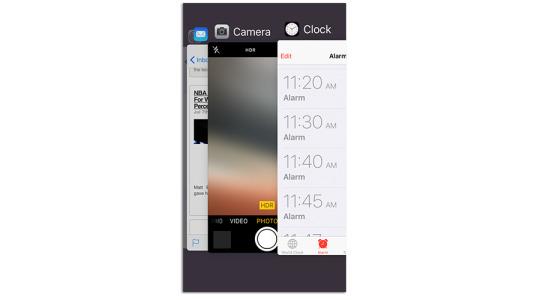
The app-switching screen has been redesigned. The “cards” that represent your open apps now overlap, so that more of them fit on a single screen.

iOS 9 Deep Plunge: The 57 Coolest Features

There’s longer battery life for all, too. On average, Apple says every iPhone will get a full hour more of life from every battery charge, which is completely awesome.
It eked out this extra juice by making a long list of tiny tweaks. One example: if your phone is face down on the table, the screen no longer lights up when you get incoming notifications.
There’s also a new Low Power Mode, clearly inspired by the similar feature on Android phones. You can turn it on at any time, in Settings -> Battery—but you’ll be invited to turn it on when your battery sinks to 20 percent and again when there’s 10 percent left.
Read More

Post Top Ad